How to Play PokéBonk: Beginner Guide
Start the original PokéBonk in your browser: enter as a Guest, choose a starter, select Classic or Survival and prepare your first Normal run.
Where should you start?
Use the original English game. No game download is provided by this wiki. The original page needs JavaScript and WebGL; if it stays blank, work through our browser checks before trying unofficial mirrors.
The original game and this guide are separate websites. Keep the guide open in another tab. This wiki does not manage your trainer account, progress or saves.
How do you prepare a run?
- Enter a Guest session or your existing account on the original site. A returning Guest may land directly in the main menu; our test did.
- Press Play for the Classic route. The menu also provides a separate Survival entry.
- In The League, select an available partner. Read the class passive, starter move and Ultimate before pressing I choose you!
- On Choose region, select an available region. Our check used Viridian Forest.
- Choose the mode and difficulty in Prepare run. We used Classic and Normal. Press Start! when ready.
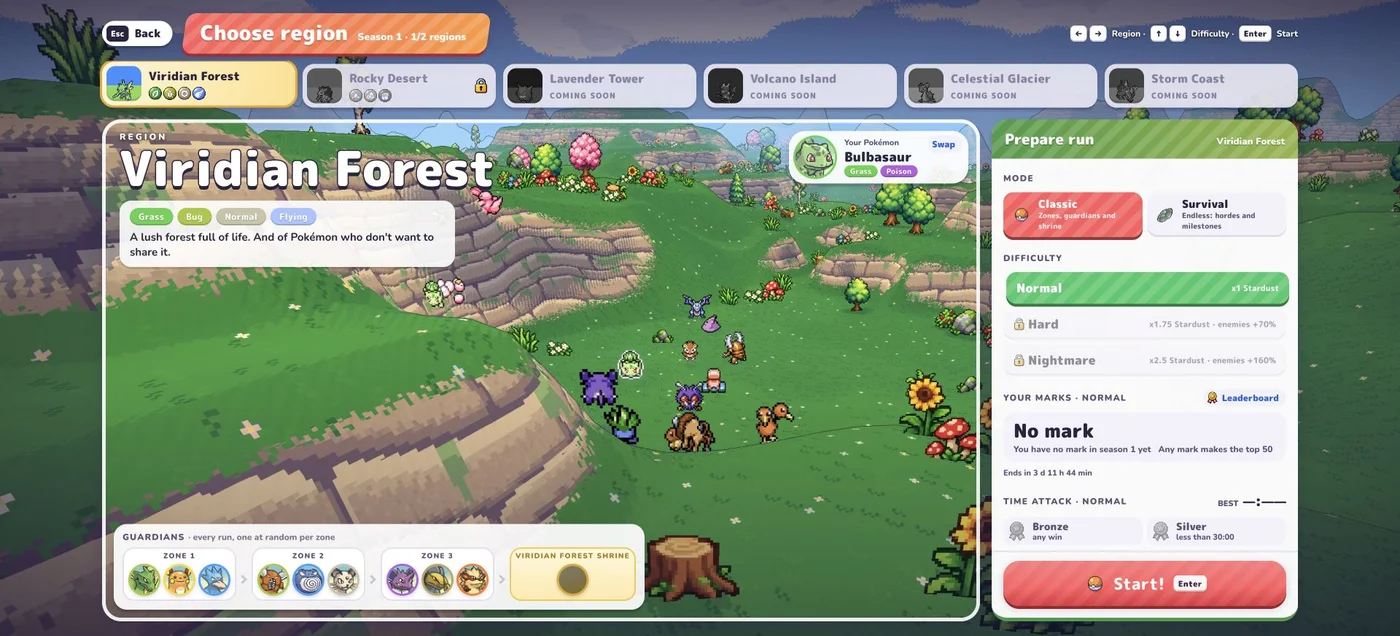
The preparation screen shows regions that are coming soon alongside available ones. A visible card is not proof that its region can currently be played. Similarly, a Pokémon in the collection is not necessarily an unlocked League member.
What should you do in the opening minute?
Keep moving and learn how your starting move reaches an enemy. Normal moves attack automatically, so your early job is to create room and keep track of your surroundings. Read the desktop controls before trying to manage several inputs at once.
In our Bulbasaur opening, Vine Whip attacked without repeated attack clicks. The pause panel showed HP, EXP, learned moves and its Synthesis passive together. That makes pause a useful place to understand what your partner currently has.
What is a useful first goal?
Treat the first run as a controls check: move comfortably, pause, find your attack in the move bar, then read an upgrade when one appears. Keep the same partner, region and difficulty while learning. That makes a change easier to notice.
Next, compare the two run modes and learn how to read a level-up choice. A short first run does not establish whether a partner is weak; this wiki does not publish win-rate rankings from these opening checks.
Sources and verification
Checked October 17, 2026 against the original English game, Beta v0.5.5, on desktop. Direct checks covered the Settings/Controls screen, Bulbasaur’s League profile, Viridian Forest preparation and an early Classic run with pause inspection. No complete clear, evolution chain, multiplayer or mobile gameplay test is claimed. Secondary references are identified inline.
Related Articles
guides
PokéBonk Not Loading? Browser and WebGL Troubleshooting
Troubleshoot PokéBonk connection errors, a missing 3D scene, lag and aiming problems with a symptom checklist that protects your Guest session.
guides
PokéBonk Controls: Keyboard, Camera and Aiming
Find PokéBonk’s desktop keys for movement, jump, slide, Ultimate and pause. Compare Automatic and Manual aiming with checked setup steps.
guides
PokéBonk Classic vs Survival: Modes and Difficulty
Compare PokéBonk Classic and Survival menu descriptions, zones, guardians, milestones and difficulty options before you start a run.
Was this helpful?
Thanks for the feedback!